Google Business Profile: How to Set It Up and Get Your Business Found Locally
 Created with AI
If you want to win customers locally, there is no way around Google, and the most effective first step is free: the Google Business Profile. Here you learn what it does, how to set it up in a few minutes, how to actually get found locally, and when ongoing help pays off. As of July 2026.
Key takeaways
- The Google Business Profile is free and gives you local visibility in Google Search and Maps, the biggest lever with the smallest effort for a local business.
- Setting it up takes about 20 minutes: create an account, add your business, verify it.
- You get found through the right category, complete details, good photos and, above all, real customer reviews.
- The biggest mistake is setting the profile up once and then leaving it.
- The difference comes from ongoing care. That is exactly what a marketing subscription with fixed monthly hours is for.
What is the Google Business Profile, and what does it do?
The Google Business Profile, formerly Google My Business, is the free listing that shows your business in Google Search and on Google Maps, complete with opening hours, contact, photos and reviews. For a local business it is the most effective first step to being found and called.
The benefit is concrete: when someone in your area searches for your service, they see you in the local map block and can call directly, start the route or open your website. The profile does not replace a website, but it is often the first point of contact and builds trust before anyone even visits your site.
What does a Google Business Profile cost?
Nothing. Creating and managing a Google Business Profile is completely free: no fees, no subscriptions and no invoices from Google. Costs only arise if you hand the ongoing care or optimisation to a professional.
Worth knowing: a good position in the local map block cannot be bought either. It comes from a complete, well-kept profile and real reviews. Anyone promising to place you "at the top" of Google for a fee is selling you smoke.
Creating a Google Business Profile: step by step
Setting it up takes about 20 minutes. Here is how:
- Create a Google account or sign in with an existing one.
- On the official Google Business page, add your business with the exact name and the right category.
- Enter location, contact details and opening hours.
- Verify the profile, usually with a code by post, phone or video.
- Complete the profile: description, services and first photos.
One small snag: verification can take a few days if it runs by post. Plan for that before you tie a campaign or launch to it. With that, you are visible. But the real difference only comes with the next steps, the optimisation.
How do you get found locally?
Visibility comes from completeness and relevance. Google prefers profiles with the right main category, complete and consistent details, current photos and regular activity. The more precisely your profile matches a search, the more likely you land in the local three-pack.
The most important levers:
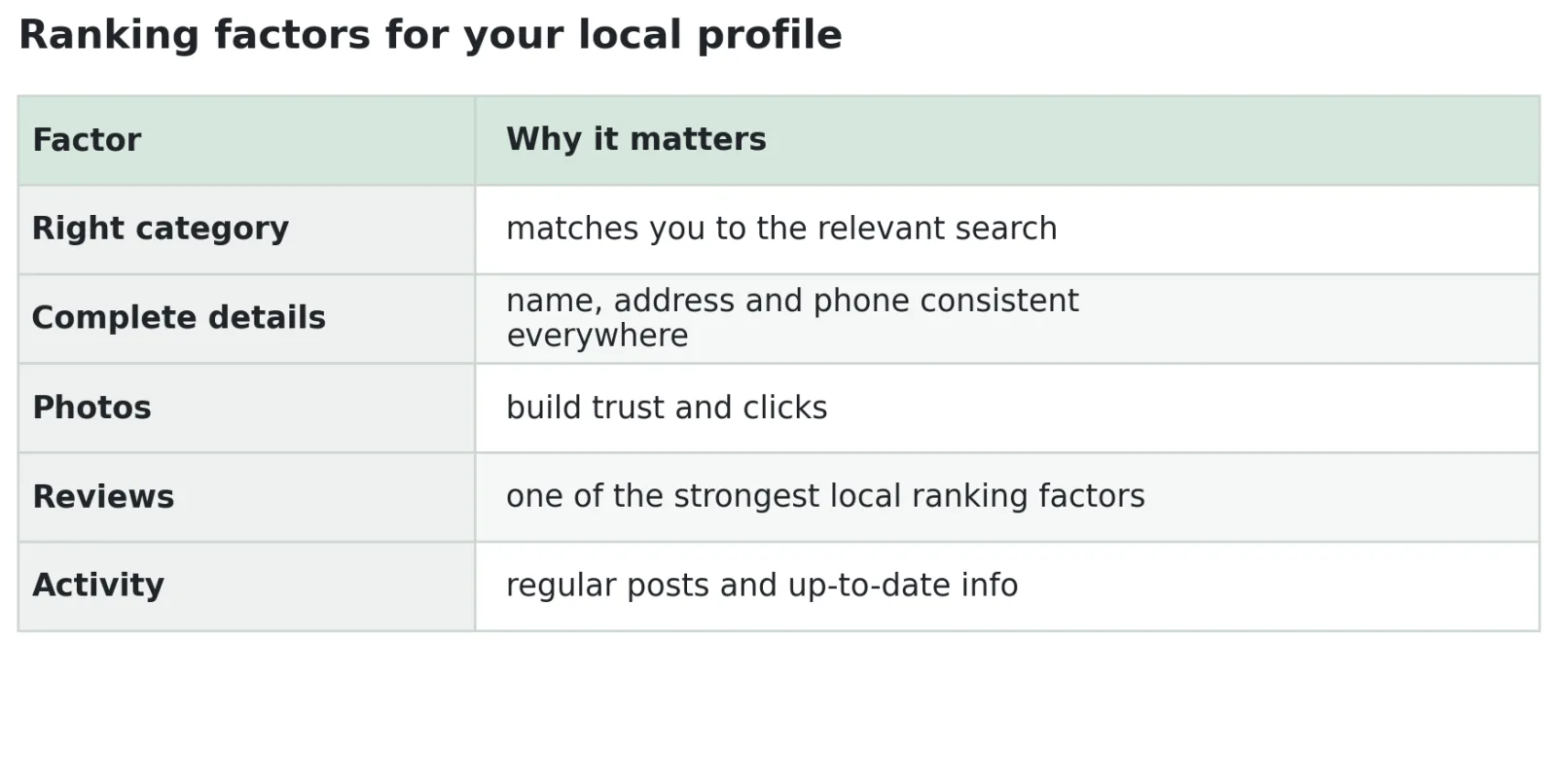
None of these levers costs money, but all of them cost some time and consistency. That is exactly the opportunity: most competitors barely maintain their profile, so whoever stays on it pulls ahead.
Reviews: the strongest local lever
Customer reviews are one of the strongest factors for local ranking and for trust at the same time. Many, recent and answered reviews lift you visibly and reassure new customers. Ask satisfied customers actively, but honestly, for a review, and reply to every one, positive or negative.
In practice: make reviewing easy, for example with a short link or QR code after the job. Respond kindly to criticism instead of ignoring it, future customers see that too. And stay away from bought reviews: Google detects them, and the damage outweighs the benefit.
Common mistakes that cost visibility
The biggest mistake is setting up the profile once and then never touching it again. A dead profile loses to a well-kept one, even when the offer is better. Avoid these classics:
- Wrong or too many categories that blur your listing.
- Inconsistent address and contact details between profile, website and directories.
- No or outdated photos that cost trust.
- Ignored reviews, positive or negative.
- No activity, meaning months without posts, offers or updates.
When does professional help pay off?
You can handle the setup yourself. The real work is consistency: posting regularly, updating photos, replying to reviews, keeping details current and watching the ranking, month after month. For many small businesses the hurdle is not skill, but simply the time to keep doing it.
An example: a painting company that uploads two project photos a month, answers new reviews and keeps its services up to date ranks far more steadily than one that sets the profile up once and forgets it. The difference is not talent, but staying on it.
That is exactly what our marketing subscription is for: a fixed number of hours per month, used flexibly for profile care, posts, reviews or social media. Instead of setting it up and forgetting it, someone looks after it continuously, without you having to hire anyone. If you want to approach visibility more broadly, our page on SEO sets the frame.
Unsure how to make your profile more visible, or who keeps it up to date? Get in touch and we will take an honest look.
Frequently Asked Questions
What does a Google Business Profile cost?
Creating and managing it is completely free. Google charges no fees and no subscriptions. Costs only arise if you hand the ongoing care or optimisation to a service provider.
How do I create a Google Business Profile?
Sign in with a Google account, add your business with the exact name and the right category, enter location, contact and opening hours, and verify the profile, usually with a code by post, phone or video. It takes about 20 minutes.
What does a Google Business Profile do?
It makes your business visible in Google Search and on Google Maps, with contact, opening hours, photos and reviews. For a local business it is the most effective first step to being found and called.
How do I move up in the local ranking?
With the right category, complete and consistent details, good photos, regular activity and, above all, real customer reviews. The position cannot be bought.
Do I have to maintain the profile myself?
You can set it up yourself easily. Success, however, depends on ongoing care. If you do not have the time, hand it over, for example through a marketing subscription with fixed monthly hours.
About the author: Sabine is part of es-wirkt, an advertising agency in eastern Switzerland. She writes about SEO, AI visibility (GEO) and digital marketing for small businesses, and helps companies get found in both classic search and AI answers.
This article was edited with AI.